Multi-Channel Ion Image Viewer
What it is
The multi-channel ion image viewer lets you overlay multiple ion images in the same view, displaying each ion as a separate channel with its own color and intensity scale. The result is a composite image that shows the spatial distribution of multiple ions simultaneously.
When to use it
Use the multi-channel viewer when you want to understand how different ions are distributed across your tissue relative to one another. Overlaying ions with complementary or contrasting spatial patterns makes it easier to identify regions enriched in specific molecular classes and to build an intuition for the molecular structure of your tissue section.
How to use it
Here's a step-by-step video showing how to use the multi-channel ion image viewer:
What results look like
Each ion added to the viewer has its own color and intensity slider, both of which can be adjusted independently. Min and max intensity values can be locked per channel or globally across all channels simultaneously using the lock control on the slider.
Once you have composed a multi-channel image you want to share, you can download it as a PNG file. The downloaded image includes a legend identifying each ion by its color.
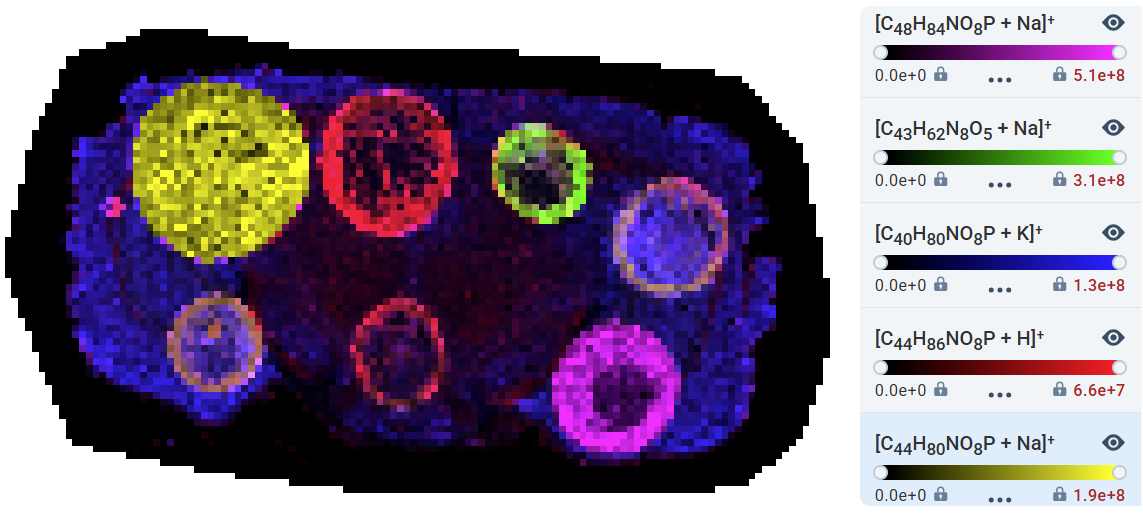 Composite ion image combining multiple channels, each assigned a distinct color with an independent intensity slider. Source: dataset